0 ratings


Item #:
145047261
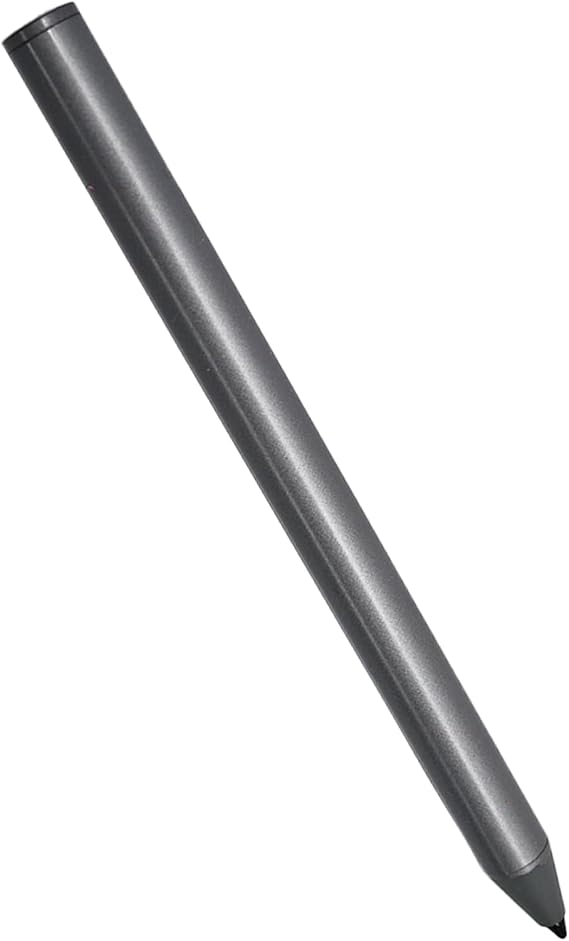
Stylus Pen Compatible with Lenovo Digital Pen 2 for Lenovo Yoga 6/7/9 Series,ThinkPad X/X1/L/P Series,IdeaPad Flex 5/7,13w/300w Yoga,ThinkBook 13x G2
60% of respondents would recommend this to a friend
Item #:
145047261
XCD 81
Price Details
Excluding Shipping & Custom charges ( Shipping and custom charges will be calculated on checkout )
*All items will import from US
0 ratings
Write a review
In stock
 Imported from USA store
QTY:
Order now and get it around Saturday, September 26
Secured transaction
Ubuy works hard to protect your security and privacy. Our advanced payment security system ensures confidentiality by encrypting your information during transmission using AES (Advanced Encryption Standards) and SSL (Secure Socket Layer) protocols. Your payment details are 100% secure as we do not share your payment details with third party sellers.
Our Top Logistics Partners


With 4096 pressure sensitivity and tilt writing support, the stylus provides precise positioning, improving productivity and delivering a superior writing experience.

Fast
Shipping

Free
Return*

Secure Packaging

100% Original Products

PCI DSS Compliance

ISO 27001 Certified



Note: Step Down Voltage Transformer required for using electronics products of US store (110-120). Recommended power converters Buy Now.


What Stands Out
Wide Compatibility
Designed specifically for Dell devices, ensuring seamless use with Inspiron, Latitude, and XPS models, enhancing productivity with perfect precision on touchscreens.
Precision Control
Offers superior accuracy for handwriting and drawing, making it ideal for creative professionals and students who require meticulous details in their work.
Ergonomic Design
Crafted for comfort and ease of use, allowing extended use without fatigue, ideal for long writing or drawing sessions on your Dell laptop.
Product Details
| Number of Batteries | 1 AAAA batteries required. (included) |
| Compatible Devices | Lenovo Digital Pen 2, Lenovo IdeaPad Flex 5 14ALC7-82R9, IdeaPad Flex 5 14IAU7-82R7 , IdeaPad Flex 5, IdeaPad Flex 5 16ALC7-82RA, IdeaPad Flex 5 16IAU7-82R8, Yoga 6 13ALC7-82UD, Yoga 7 14ARB7-82QF, Yoga 7 14IAL7-82QE, Yoga 7 14IAL7-82VD, Yoga 7 16IAH7-82UF, Yoga 7 16IAP7-82QG, Yoga 9 14IAP7-82LU,ThinkPad X/X1/L/P Serise Pen, ThinkBook 13x G2 IAP-21AT |
| Pressure Sensitivity | 4096 levels |
| Minimum Required Operating System Version | Android 3.0 Honeycomb |
| Item Weight | 3 g |
| Item Dimensions | 0.39 x 0.39 x 0.39 inches (1 x 1 x 1 cm) |
| Color | Gray |
| Enclosure Material | Plastic |
| Brand | Mingxiong |
| Number of Packs | 1 |
| Unit Count | 1 Count |
| Manufacturer | Mingxiong |
| Material | Plastic |
| Compatible Devices | Lenovo Digital Pen 2, Lenovo IdeaPad Flex 5 14ALC7-82R9, IdeaPad Flex 5 14IAU7-82R7 , IdeaPad Flex 5, IdeaPad Flex 5 16ALC7-82RA, IdeaPad Flex 5 16IAU7-82R8, Yoga 6 13ALC7-82UD, Yoga 7 14ARB7-82QF, Yoga 7 14IAL7-82QE, Yoga 7 14IAL7-82VD, Yoga 7 16IAH7-82UF, Yoga 7 16IAP7-82QG, Yoga 9 14IAP7-82LU,ThinkPad X/X1/L/P Serise Pen, ThinkBook 13x G2 IAP-21AT See more |
| Item dimensions L x W x H | 0.39 x 0.39 x 0.39 inches (1 x 1 x 1 cm) |
Who Should Buy?

-
Professional Artists
Ideal for artists needing precision and sensitivity for drawing or sketching on touchscreens with supported Dell devices.
-
Students and Scholars
Perfect for taking notes or annotating documents efficiently on their Dell touchscreen laptops during classes or study sessions.
-
Business Professionals
Beneficial for business users who frequently present or sign documents digitally, enhancing productivity with touch-enabled Dell laptops.

-
Casual Users
May not be necessary for occasional users who mainly use their devices for basic tasks, lacking advanced stylus features.
Product Description
Stylus Pen Compatible with Lenovo Digital Pen 2 for Lenovo Yoga 6/7/9 Series,ThinkPad X/X1/L/P Series,IdeaPad Flex 5/7,13w/300w Yoga,ThinkBook 13x G2 IAP-21AT Pen(Gray)
Have any Query? Chat with us
Customer Questions & Answers
-
Question:
What devices are compatible with the Stylus Pen for Dell Active Pen PN5122W?
Answer: The Stylus Pen for Dell Active Pen PN5122W is designed to be compatible with various Dell touchscreen laptops including the Inspiron 7620/7625 2-in-1s and Latitude 5310/7320/7410/9420/9510 models. This broad compatibility ensures users of different Dell devices can enjoy the precision and functionality that the stylus offers. If you're working on detailed designs, taking notes, or navigating through applications, this pen enhances the touchscreen experience significantly. -
Question:
How does the precision of the Dell Active Pen PN5122W improve my workflow?
Answer: The precision of the Dell Active Pen PN5122W allows for accurate input and control when drawing, writing, or navigating. With advanced pressure sensitivity and tilt recognition, it responds to various touch levels, making it ideal for professionals like graphic designers or students who need to take detailed notes. It helps transform your laptop into an efficient tool, enhancing productivity and creativity by allowing a more natural way to interact with your device. -
Question:
Can I use the Dell Active Pen PN5122W for sketching and drawing?
Answer: Absolutely! The Dell Active Pen PN5122W is perfect for sketching and drawing thanks to its high sensitivity and tilt functionality. Artists and designers will particularly appreciate its ability to deliver varying line thickness based on pressure used, making it easier to create detailed artwork or illustrations. You can turn your Dell touchscreen laptop into a digital canvas, enabling a seamless transition from traditional sketching to digital artistry. -
Question:
Is the Dell Active Pen PN5122W rechargeable or does it require batteries?
Answer: The Dell Active Pen PN5122W typically comes with a replaceable battery that ensures you can use it for extended periods without the need for frequent recharging. This design provides convenience as you can quickly swap out the battery when needed. It's a practical choice for users who rely on their stylus for ongoing creative projects, note-taking in meetings, or general navigation, allowing for uninterrupted use. -
Question:
What features make the Dell Active Pen PN5122W stand out from other stylus pens?
Answer: The standout features of the Dell Active Pen PN5122W include its high pressure sensitivity levels and tilt functionality that cater to precise and varied input. Unlike many generic styluses, this pen is engineered specifically for Dell touchscreen devices, ensuring optimal performance and compatibility. This makes it especially useful for tasks such as digital art, where nuance can greatly affect the outcome. Additionally, the pen's design is ergonomically friendly for those extended usage sessions. -
Question:
How do I pair the Dell Active Pen PN5122W with my laptop?
Answer: To pair the Dell Active Pen PN5122W with your laptop, typically, you simply need to ensure Bluetooth is enabled on your device, then follow the pairing instructions in the settings menu. For laptops that feature touchscreens, the process is generally user-friendly. Once paired, you'll unlock the full potential of the pen, allowing for intuitive interactions such as gestures and shortcuts, which streamline your operations whether in professional or educational environments. -
Question:
What should I do if my Dell Active Pen PN5122W is not working?
Answer: If your Dell Active Pen PN5122W isn't working, first check the battery status to ensure it's not dead. Next, restart your device and ensure that all drivers and updates are current. If the problem persists, unpair and re-pair the pen with your laptop. Often, these steps can resolve connection issues. If these solutions don’t work, refer to Dell’s support resources for further troubleshooting tips tailored specifically to your stylus and device. -
Question:
Is there a difference between the Dell Active Pen PN5122W and other styluses?
Answer: Yes, the Dell Active Pen PN5122W differs from generic styluses through its tailored design for Dell devices, enhancing performance in touch responsiveness and compatibility. It features advanced functionalities such as pressure sensitivity, making it preferable for professional-use cases like digital artistry or note-taking. This aligns with the needs of users looking for a seamless experience, allowing the pen to adapt to various tasks effectively unlike other non-specific options. -
Question:
What can I do to maintain my Dell Active Pen PN5122W?
Answer: To maintain your Dell Active Pen PN5122W, regularly check and replace the battery as necessary to ensure optimal performance. Also, keep the pen clean by gently wiping the tip with a microfiber cloth to prevent dirt buildup which can affect tracking accuracy. Finally, store it safely in a case or designated spot to prevent physical damage or misplacement. Maintaining your pen helps retain its functionality, ensuring you get the best performance over time. -
Question:
Where can I buy the Dell Active Pen PN5122W in Saint Vincent?
Answer: You can buy the Dell Active Pen PN5122W at Ubuy, which offers a wide selection of electronic accessories tailored for various models. Shopping at Ubuy ensures that you receive authentic products with easy access to detailed product descriptions and customer reviews, helping you make an informed decision about your purchase. Their platform is user-friendly, making it simple to find the stylus that perfectly suits your Dell touchscreen laptop needs.
Mingxiong Stylus Pens Editorial Review
Stylus Pen Compatible with Lenovo Digital Pen 2 for Lenovo Yoga 6/7/9 Series,ThinkPad X/X1/L/P Series,IdeaPad Flex 5/7,13w/300w Yoga,ThinkBook 13x G2 IAP-21AT Pen(Gray) seems to struggle with connectivity, as several users noted challenges in pairing the pen with compatible devices such as the Lenovo Yoga series. Many users indicated that despite its listed compatibility, the pen often failed to maintain a connection, with some reporting it worked only briefly before disconnecting. Additionally, the construction quality has been criticized, with remarks about its plastic materials and overall robustness. Despite its pressure sensitivity of 4096 levels, users have expressed a preference for more reliable alternatives, indicating this pen may require improvements to meet their expectations.
Customer Reviews & Ratings
1 customers ratings
-
5 Star
100%
-
4 Star
0%
-
3 Star
0%
-
2 Star
0%
-
1 Star
0%
Review this product
Share your thoughts with other customers
Pros
- Compatible with various Lenovo devices
- Lightweight at just 3 grams
- High pressure sensitivity for precision
- Compact size for easy portability
- Includes 1 AAAA battery
Platform Trust & Buyer Confidence

JK
Jasmin
Verified buyer
“Great products and very good service: very easy and very fast international delivery.”
9 September 2026 · via Trustpilot
AG
Anke
Verified buyer
“Wonderful online shopping experience, smooth transaction from the start. Payment method works conveniently and delivery is unexpectedly fast and reliable. You go the extra mile for service. What makes this even more amazing, you deliver to Namibia. I will remain a happy Ubuy customer and will increase my purchases for sure! Thank you!”
10 September 2026 · via Trustpilot
H
Hazel
Verified buyer
“Very easy to find the products what you need, and so fast delivery, that’s why I highly recommended to others costumers to used ubuy.”
10 September 2026 · via Trustpilot
O
Opaleye
Verified buyer
“I received exactly what I ordered I was skeptical about your site because that was my first time to order. But the order came timely and neatly packaged. I was not disappointed. Thank you.”
11 September 2026 · via Trustpilot
AC
Adele
Verified buyer
“Easy to find and order what you want on the website. Delivery is quick to the UK”
8 September 2026 · via Trustpilot
Secure Checkout
Global Delivery
Easy Returns
Genuine Products
Product Price History
Important information
- Limitations : For products shipped internationally, please note that any manufacturer warranty may not be valid; manufacturer service options may not be available; product manuals, instructions, and safety warnings may not be in destination country languages; the products (and accompanying materials) may not be designed in accordance with destination country standards, specifications, and labeling requirements; and the products may not conform to destination country voltage and other electrical standards (requiring use of an adapter or converter if appropriate). The recipient is responsible for assuring that the product can be lawfully imported to the destination country. When ordering from Ubuy or its affiliates, the recipient is the importer of record and must comply with all laws and regulations of the destination country.
- Not all the products listed on Ubuy are for sale, as Ubuy is a global search engine. Products are subject to export/trade regulations.
XCD 81
Order now and get it around Saturday, September 26
This item is not restrict in my country.(Please click on above link if this item is not restrict in your country, So our team will review and allow.)
QTY:
Secured transaction
PCI DSS compliant and ISO 27001:2022 certified, with encrypted payments and full buyer protection on every order.
Our Top Logistics Partners
Fastest cross-border delivery
Features & Benefits
- Compatible with a wide range of Dell devices including Inspiron, Latitude, and XPS.
- Supports AES 2.0 protocol for seamless device interaction.
- Features 4096 pressure sensitivity for high precision and effective usage.
- Natural feel encourages creativity in note-taking, sketching, and navigation.
- Palm rejection technology for comfort and accuracy while using the stylus.
- Enhance your productivity and unleash your creativity effortlessly.
Ubuy Assurance
Experience worry-free shopping with 100% original products, PCI DSS-compliant payment security, ISO 27001-certified data protection, the fastest cross-border delivery, free returns *, and secure packaging on every order.